Automation is supposed to be your “silent employee,” but in 2026, it can easily become your most expensive one. The battle between Zapier and Make isn’t just about features; it’s about how your brain works and how much you’re willing to pay for “No-Code” convenience.
We broke down the real costs of running identical workflows in both. Here is the skeptical truth about where your money actually goes.
The Pricing Illusion: Tasks vs. Operations
This is the biggest “Gotcha” in the industry.
Zapier (The “Simplicity Premium”): Zapier’s Professional Plan ($19.99/mo) gives you 750 tasks. In Zapier, a “task” is an action. If you have a Zap that says: “When I get a lead, add to Sheet, then Send Slack, then Email,” that is 3 tasks every time it runs. You will burn through 750 tasks by lunchtime on the 10th of the month.
Make (The “Operation Tax”): Make’s Core Plan ($9/mo) gives you 10,000 operations. It looks like a math error in your favor, but be careful. Make counts everything. Every time it checks a filter, every time it routes data, and even when it fails — it burns an operation. A workflow that uses 3 tasks in Zapier might use 10 operations in Make.
The Skeptic’s Math: Even with the “Operation Tax,” Make is still 5x–10x cheaper for high-volume users. You pay Zapier for the privilege of not having to think about “internal logic.”
What These Workflows Actually Cost: The Real Math
Here’s what three common workflows actually cost when you do the math on each platform’s billing model.
Workflow 1 — Lead Capture: Form submission → add to Google Sheet → send Slack notification → create CRM contact. Simple, linear, runs ~20 times/day.
- Zapier: 3 tasks × 20 runs × 30 days = 1,800 tasks/month. That blows past the 750-task Starter plan by day 13. You’d need the $49/mo Professional plan.
- Make: 7 operations × 20 runs × 30 days = 4,200 operations/month. Comfortably inside the 10,000-op Core plan at $9/mo.
Workflow 2 — Content Repurposing: New blog post → generate social media variants → schedule to 3 platforms → log in spreadsheet. Medium complexity, runs ~3 times/day.
- Zapier: 4 tasks × 3 runs × 30 days = 360 tasks. Manageable alone, but stacked with Workflow 1, you’re deep into Professional territory.
- Make: 12 operations × 3 runs × 30 days = 1,080 operations. The router and filters inflate the count, but still well within budget.
Workflow 3 — Order Processing: New Shopify order → check inventory → route by order value → update CRM → send confirmation email → flag high-value orders for manual review. Complex, multi-branch, runs ~50 times/day.
- Zapier: Can’t build this properly in one Zap. The branching logic requires Paths, and the looping limitations mean you’d need to split it into 3 separate Zaps. Total: ~4,500 tasks/month across the three.
- Make: One scenario handles everything. 15 operations × 50 runs × 30 days = 22,500 operations. You’d need the $16/mo Pro plan.
The Bottom Line:
- Zapier: $49/mo (Professional) — and Workflow 3 would still feel duct-taped together.
- Make: $16/mo (Pro) — all three workflows running cleanly in single scenarios.
The cost difference is 3x. But the real gap is Workflow 3 — Make handles it elegantly in one visual scenario. Zapier needs three separate Zaps held together with hope.
1. Zapier: The “Don’t Make Me Think” Stack
The Verdict: STACK ✅ (For non-technical founders)
Zapier is the “Apple” of automation. It just works.
The AI Copilot: In 2026, Zapier’s Copilot is actually useful. You can type: “When a new Shopify order comes in over $100, find the customer in HubSpot and add a ‘VIP’ tag,” and it builds the logic for you.
The “Agents” Pivot: Zapier has launched Zapier Agents — AI systems that can run in the background and make “judgement calls” across 8,000+ apps. If you want to build an “AI Employee,” Zapier’s ecosystem is the most mature.
The “Friction” Report: You are locked into a linear “If This, Then That” box. If you need to loop through a list of 50 items, Zapier makes it feel like you’re trying to build a rocket with Lego Duplo.
2. Make: The “Visual Powerhouse”
The Verdict: STACK ✅ (For operations engineers)
Make (formerly Integromat) is a digital playground. You don’t build forms; you build flowcharts.
The Visual Edge: You can see your data moving. You can build “Routers” that split one lead into five different paths based on their budget. It is infinitely more powerful than Zapier for complex business processes.
Error Handling: This is the dealbreaker. If a Zapier step fails, you get a notification and your workflow dies. In Make, you can build Error Routes (Resume, Rollback, or Break) with configurable retry logic. It’s the difference between a toy and a piece of infrastructure.
The “Friction” Report: The learning curve is a wall. If you aren’t comfortable with terms like “JSON,” “Iterators,” or “Webhooks,” you will spend three days crying at your monitor.
The 2026 Factor: MCP and AI Context
Both tools now support MCP (Model Context Protocol).
Zapier MCP: Lets you “plug” 8,000 apps directly into ChatGPT or Claude. You can tell Claude to “Update my CRM,” and it uses Zapier to do it.
Make MCP: More “developer-focused.” It lets you turn your complex Make scenarios into “Tools” for your custom AI agents.
The Comparison: At a Glance
| Feature | Zapier (Professional) | Make (Core) |
|---|---|---|
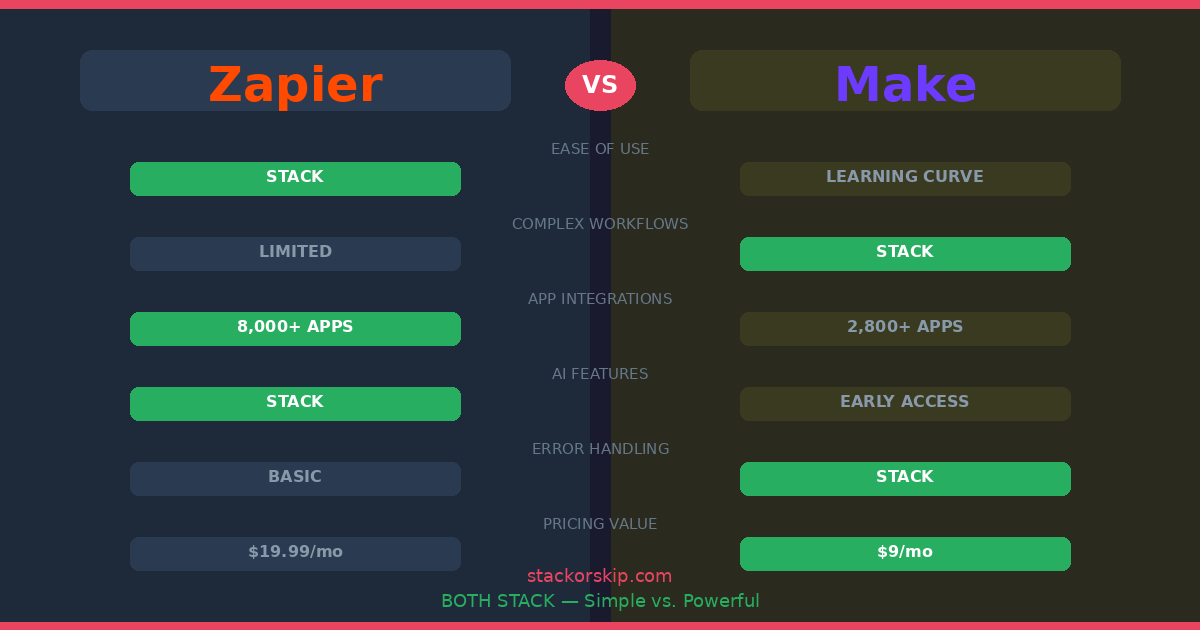
| Mental Model | Linear (Step 1, 2, 3) | Visual (Flowchart) |
| Starting Price | $19.99/mo (750 tasks) | $9/mo (10,000 ops) |
| Cost at Scale | $49–69/mo (2K–50K tasks) | $16–29/mo (10K ops + features) |
| App Library | 8,000+ | 3,000+ (+ HTTP for any API) |
| AI Builder | Copilot (Very mature) | Maia (Early Access) |
| Error Handling | Basic notifications | Pro-grade (Resume, Rollback, Break) |
| Best For | Marketing managers | Operations engineers |
The Migration Reality: When to Switch (And What It Costs)
Already on one platform and wondering if you should switch? Here’s the honest truth.
There is no migration tool. You cannot export Zaps from Zapier and import them into Make, or vice versa. Every automation has to be rebuilt from scratch. For a business running 10-15 workflows, expect to spend a full weekend (or more) recreating everything.
When the switch makes sense: If your Zapier bill has crossed $100/month and keeps climbing, the rebuild time pays for itself within 2-3 months of Make’s lower pricing. If you’re hitting Zapier’s complexity ceiling (needing loops, branches, or error handling it can’t do), the switch isn’t about money — it’s about capability.
When it doesn’t: If you’re running 5 or fewer simple Zaps and your bill is under $50/month, the rebuild effort isn’t worth the savings. Stay on Zapier and spend that weekend on something that grows your business.
The Final “Stack or Skip” Verdict
Stack Zapier if: You are a marketing manager or a solo founder who needs things to work now. You don’t have time to learn a new language, and your budget can handle the “Simplicity Premium.”
Stack Make if: You are building the “Engine” of your business. If you’re processing thousands of orders, syncing complex databases, or building custom AI agent chains, Make is the only logical choice.
Skeptic’s Tip: Start with Zapier for your first 5 automations. The moment your monthly bill hits $100, that is the signal that you need to spend a weekend learning Make.
Disclosure: This article contains affiliate links. If you sign up through our links, we may earn a commission at no extra cost to you.
Related articles: