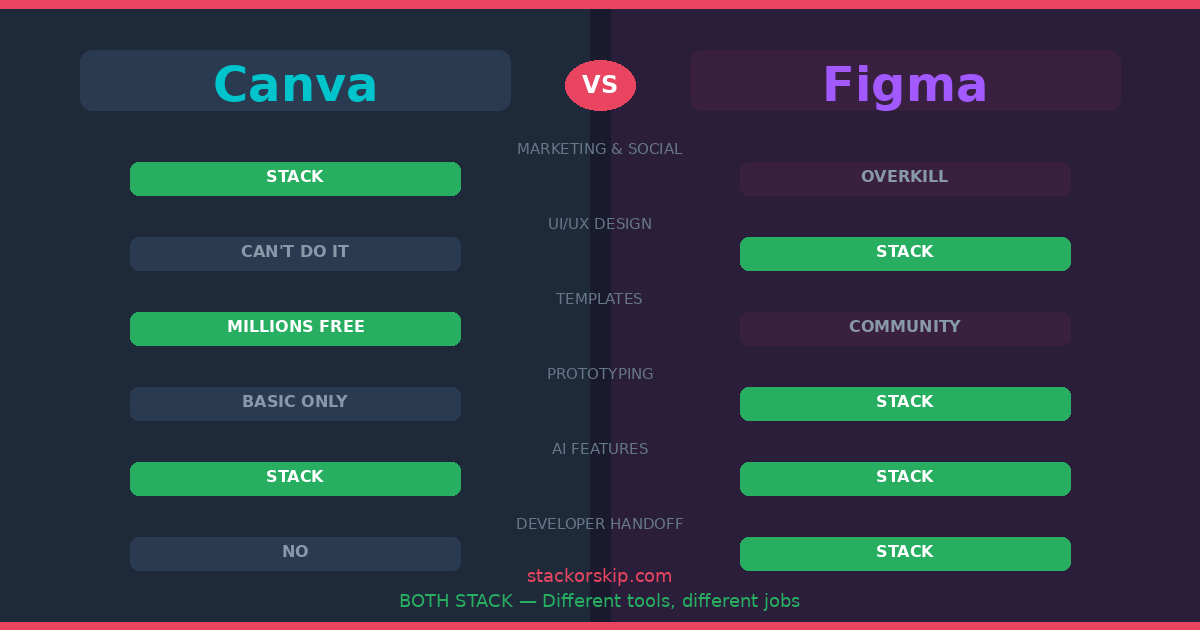
In 2026, the lines have blurred. Canva can build websites; Figma can make slide decks. But don’t let the marketing fool you. These tools are philosophically opposed. One is built to hide the complexity of design so you can ship a post in ten minutes; the other is built to master the complexity so you can build a product that survives a million users.
If you’re choosing between them, you’re actually choosing your job description.
1. Canva: The “Social Media Microwave”
The Verdict: STACK ✅ (For the 90% of us who aren’t designers)
Canva is the ultimate “No-Skill” stack. In 2026, their Magic Studio has reached a point where you don’t even need to pick a template anymore — you just describe the “vibe,” and the AI generates a brand-compliant layout.
The Skeptic’s “Friction” Report:
The “Template Sea” Problem: Because Canva makes it so easy, 90% of small business marketing looks identical. If you rely too heavily on their “Magic Design,” your brand will have the personality of a stock photo.
The “Locked-In” Asset Trap: Canva’s library of 100M+ assets is incredible until you try to leave. If you build your brand on Canva-exclusive fonts and elements, moving to a professional suite later is a manual, expensive nightmare.
The AI Fluff: “Magic Switch” (resizing one design for 10 platforms) is a lifesaver, but the “AI Image Generator” still produces the occasional 6-fingered person. It’s a tool for speed, not perfection.
Why it’s a Stack: If your goal is to spend less than 30 minutes a day on design so you can get back to running your business, Canva is untouchable.
2. Figma: The “Architect’s CAD”
The Verdict: STACK ✅ (For the builders)
Figma isn’t a “graphic design” tool — it’s a system builder. If you are designing an app, a complex website, or a software interface, Figma is the only logical choice in 2026.
The Skeptic’s “Friction” Report:
The “Component Hell” Trap: Figma allows for infinite precision, which means you can spend four hours building a “Master Button Component” with 40 variants instead of actually designing your landing page. It invites over-engineering.
The Learning Wall: You cannot “guess” your way through Figma. If you don’t understand Auto-Layout or Parent-Child components, your files will become a chaotic mess that developers will hate.
The “Pro” Tax: In 2026, Figma’s Dev Mode (the feature that lets engineers actually use your designs) is a paid seat. If you have a team of five designers and five developers, your monthly bill is going to hurt.
Why it’s a Stack: If you hear the words “User Flow,” “Prototype,” or “Design System,” Figma is the industry standard. Using Canva for these tasks is like trying to build a skyscraper with popsicle sticks.
The 2026 Reality: Can You Use Both?
Most high-performing teams in 2026 use a “Hybrid Stack”:
Figma for the DNA: The design team builds the “Source of Truth” — logos, UI components, and web layouts — in Figma.
Canva for the Distribution: The design team exports those assets into Canva Brand Kits so the marketing team can make their own Instagram posts and flyers without “breaking” the brand.
The Pricing at Scale: Where It Actually Hurts
The per-seat prices look manageable until you do the team math.
Canva Teams — 5 marketers: $14.99/mo × 5 = $75/month. Everyone gets full access to templates, Brand Kit, AI tools, and 100M+ assets. No feature gating. No surprise fees. This is one of the fairest team pricing models in SaaS.
Figma Professional — 5 designers + 5 developers: $16/mo × 5 designers = $80/month for design seats. But here’s the catch: Dev Mode (where engineers inspect designs, grab CSS, and measure spacing) requires its own paid seats. Add 5 developer seats and your bill jumps significantly. A 10-person product team on Figma can easily hit $150-200/month — 2-3x the cost of Canva Teams at the same headcount.
The Verdict: Canva is transparently cheap at scale. Figma’s costs hide behind the Dev Mode paywall, and they add up fast once your engineering team needs access.
The Portfolio Problem: What Happens When You Outgrow One?
This is the question nobody talks about.
Canva → Figma: If your startup grew and you need real product design, your Canva assets don’t transfer. There’s no import. Your marketing team’s entire library of branded templates, social posts, and presentations stays locked in Canva’s ecosystem. You’re not migrating — you’re starting over in Figma while maintaining Canva in parallel.
Figma → Canva: Rarely happens. But if a design agency completes your product design and hands you the Figma files, your marketing team can’t open them in Canva. Someone has to manually recreate brand elements in Canva’s Brand Kit.
The Reality: Neither tool exports to the other’s format. Canva exports to PDF, PNG, and PPTX. Figma exports to PDF, PNG, and SVG. Choose your primary tool carefully, because switching costs are measured in hours, not minutes.
The StackOrSkip Take
For a site like ours — branded featured images, consistent colors, dark backgrounds with accent badges — Canva is the obvious choice. You don’t need component libraries, prototyping, or developer handoff for blog graphics. You need a consistent look that ships fast.
That’s the Canva value proposition in one sentence: it lets you focus on the business instead of the design.
The Comparison: At a Glance
| Feature | Canva (Magic Pro) | Figma (Professional) |
|---|---|---|
| Philosophy | “Good enough, right now.” | “Perfectly built, forever.” |
| Learning Curve | 15 Minutes | 15 Days (minimum) |
| AI Strength | Layout & Asset Generation | Layout automation & Prototyping |
| Output | JPG, PNG, MP4, Print | Live Prototypes, CSS, React Code |
| Collaboration | “Edit together” | “Build together” (Branching/Versioning) |
| Price (per seat) | $12.99/mo | $16/mo + Dev Mode fees |
| Free Plan | Yes (genuinely useful) | Yes (3 files, limited) |
The Final “Stack or Skip” Verdict
Stack Canva if: You are a marketer, a Shopify store owner, or a “solopreneur.” You need to look professional on social media and you don’t have time to learn what a “Bezier curve” is.
Stack Figma if: You are building software, an app, or a high-conversion website. You need to hand off specs to a developer, and you care about “Responsive Design” more than “Cute Templates.”
The Skeptic’s Choice: For 90% of people reading this, Canva Pro is the better ROI. It’s the “Microwave” that keeps your business fed. Only move to Figma when you’re ready to build the “Kitchen.”
Disclosure: This article contains affiliate links. If you sign up through our links, we may earn a commission at no extra cost to you.
Related articles:
- Zapier vs Make 2026: The “Simplicity Premium” vs. The “Operation Tax”
- Semrush vs Ahrefs 2026: Which One Actually Pays for Itself?
- Best Email Marketing Platforms 2026: Stop Paying the “Success Tax”
- Best AI Writing Tools 2026: 10 Tools Researched & Ranked
- Jasper AI Review 2026: Stack or Skip?
- Notion vs ClickUp 2026: Which Project Management Tool Wins?